Hello everyone,
I've downloaded the latest version of the BoT, and when I open it, perfectly works. But when it comes to attacking, after I find a match, the program stops working, while checking the target if it's a dead base or not.
Can you help me solve this please?
Thanks in advance,
Kekpls.
System: 32 Bit Windows 7
screenshot of the error: CLICK HERE
screenshot of the bot's file: 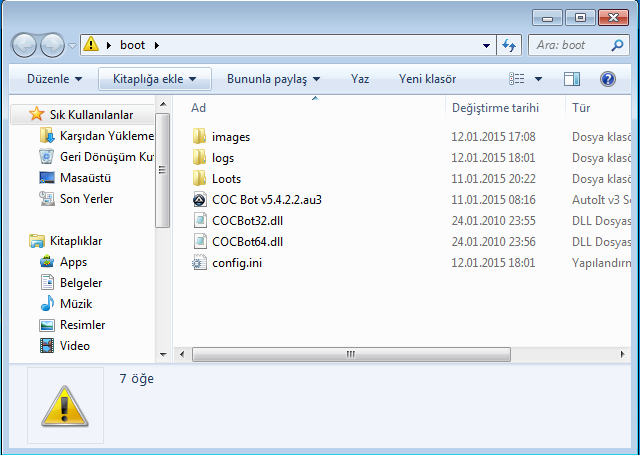
Video Game Reverse Engineering
❗ Stopped working, need help.
Started by kekpls · Jan 12, 2015
Try to compile script. Renember to choice version as ur Windows ( x64 or x32 )
where can I choose the version?
Please read before asking and stop spamming
https://the.bytecode.club/showthread.php?tid=213&page=2
i am also getting same error when it found the base ''bot stopped working'' (v5.4.2 and v5.4.2.2 also) and then close .........plz help thnx🙂
windows 7 32-bit also compiled the bot according to system
i don't think its about image set the site share dinobot
There is an error in the code, it should be fix next version. It is due to trying to dispose of the image saved to the memory and sometimes it tries to dispose twice or something like that.
the error come from the COCbot32.dll
I was tried to edit the au3 and changed all COCbot64.dll to COCbot32.dll. I got the same error with windows 32bit and 64bit.
5.3 and 5.4 are the same
@GkevinOD thank you so much for rply ....now i am ready to wait for next version instead of searching on google to change 32 into 64-bit 😛...thnx again 🙂
hort hort
i've upgraded my windows 7 starter 32 bit to a windows 7 ultimate 64 bit, now it works smoothly,
you may give it a try.
regards
There is an error in the code, it should be fix next version. It is due to trying to dispose of the image saved to the memory and sometimes it tries to dispose twice or something like that.
@GkevinOD bro you said the error will fix in next version but v5.4.2.2.2 still have the same error .....and by deleting 32&64.dll files the ''bot stopped working'' get fix when find dead base but another error come in bot log like ''error cannot check for dead base ,attacking'' and it attacks even the base is active or not(for windows 7 32-bit)..... 🙂
Got something to add?
Join the conversationLog in to post a reply.