The Bytecode Club
Log inJoin the club
Video Game Reverse Engineering

Test Function for Background Feature

Started by Antidote · Jan 14, 2015

61 replies1,045,966 views
Jan 15, 2015#11

@danilp12
Due to the script written, antidote already mentioned the bs window need to be in foreground. Anyway, think most of you do the test wrongly...

Can try again if bs window is dragged out of desktop, will you still able to capture the bs screenshot? Think the objective is to see if the windows is hidden away from desktop, will it still capture it? I assume many did the test with the bs window visible to you. Try drag it away from desktop and test again.

What I derive from this test and what most of you have.. I realised I can't activate aero with bs open. Seem to me is hardware problem... And I suspect is motherboard.

Steps I taken to derive this:
Background:
Old mother with virtualization enable ( not the latest Intel vt-x or and-v)
New graphic card asus nvidia gtx 650ti 2 gb
6gb ram
Windows 7 64bit
Latest root bs 0.9.6.4072/92

What I did.
Install graphic driver from both nvidia and asus website, test separately. Fail to background
Change to lowest version of bs. Still fail
Did those desktop composition disable , run admin mode etc.
Try enable and disable aero but realised from this script test, enable or disable, aero is always off for me when I start bs. Unable to enable it. Strange... Latest graphics driver and aero can be enable without bs but once bs start, states compatibility problem and aero disabled. My graphic card was quite recent so I doubt it has compatibility problem.

Only think I can think of is my old motherboard.... Can those testers here go to your motherboard bios and see if you have vt-x or amd-v feature... If you have, can you capture the bs window when hidden? Especially those using windows 7

Only thing I haven't do is try installing windows 8.1 to do the test... Well try over the weekend...
Jan 15, 2015#12

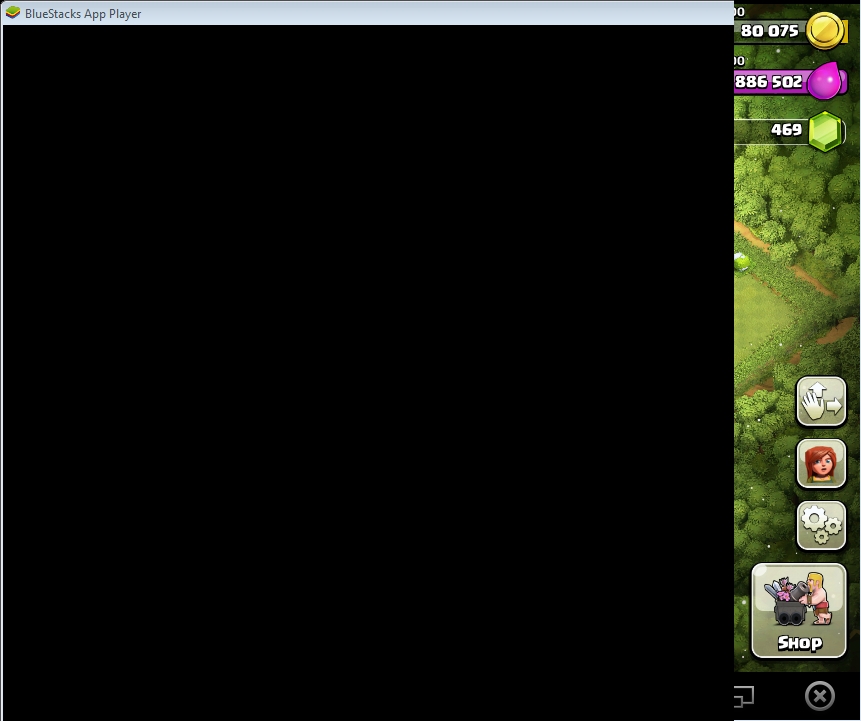
thanks for the feedback guys. Tbh I don't have much knowledge in this area, still reading up on the Internet and trying to isolate the issues. What I realized is that when Aero is disabled, the function fails to capture BS's handle and instead print what is displayed on screen in that region (thus the overlap image). So it will have problems if Aero is disabled and BlueStacks is not in the foreground.

@dinobot: I figured out that the option to Disable Desktop Composition in HD-FrontEnd.exe will disable Aero everytime it starts. This will actually hinder the capture function of the bot. Can you uncheck that option and try again? It's weird I know since other bots' method actually relies on Aero disabled..

Jan 15, 2015#13

I understand the desktop composition checked mean aero disable.. Tried unchecked too... Aero still unable to be enable when bs starts.

Just want to prove if I am right on the motherboard... Any old pc like maybe 4-5 years ago able to do the background? Windows 7? Can people tell me whether their motherboard has vt-x or amd-v? Coz I think the virtualization is affecting how bluestacks identify our hardware like graphic card. Just like VMware.

Anyway... I am installing windows 8.1 dual boot now on my pc to try again... Will get back

Jan 15, 2015#14

Windows 7 32bit. Disable desktop composition is checked.

I dragged BS to the left, mostly outside of the Desktop.

The SS is black for the portion outside the desktop.


 BLUESTACKS

BlueStacks is open and not minimized
Resolution: 860, 720

 AUTOIT

Version: 3.3.12.0
Native x32
Au3 Script

 SPECS

CPU: X64
OS: X86; WIN_7

 DESKTOP

Aero Disabled. Please enable Aero and try again
Depth: 32
Resolution: 900, 1440
Refresh rate: 59

 FUNCTION CALL

_WinAPI_GetDC: 0x0C010E36
_WinAPI_CreateCompatibleDC: 0xC401113D
_WinAPI_CreateCompatibleBitmap: 0xB8051062

I unchecked "Disable desktop composition", made sure I was running aero. Rebooted and when I start BS windows changes to Basic mode (turns off areo) and I get the same results.

Jan 16, 2015#16

installed windows 8.1 x64

Aero enabled while BS start and successfully able to do background capturing.

Likely is software problem (graphic driver not compatible). Not hardware like i earlier mentioned. Strange...

Also I notice slightly better performance of the graphics.. smoother... likely due to proper loading of graphic driver.

Maybe time to move on to windows 8.1 afterall... on dual boot.. lol..

Jan 16, 2015#17

installed windows 8.1 x64

Aero enabled while BS start and successfully able to do background capturing.

Likely is software problem (graphic driver not compatible). Not hardware like i earlier mentioned. Strange...

Also I notice slightly better performance of the graphics.. smoother... likely due to proper loading of graphic driver.

Maybe time to move on to windows 8.1 afterall... on dual boot.. lol..

i guess im gonna to try that out! and see if its work for me =D

Jan 16, 2015#18

@dinobot im on win 8 x64 now...just take the screenshot...and guess what...it work!! like you said, it must be soft problem =D

Jan 16, 2015#19

Think your 5770 was one generation after my previous graphic card 4770. At time only windows 7 compatible. At least 5-6 yr old.

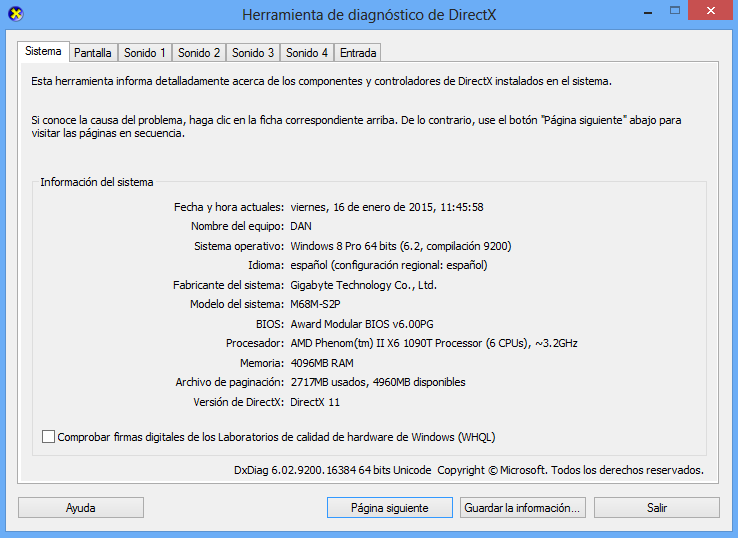
Check your DirectX version in windows now.  Think the screen capture is control by software rendering by DirectX.

I tried Andy emulator on windows 7 but it is very lag to me. Now I am going to try it again in windows 8.1 to see if it is smoother...

Jan 16, 2015#20

well..i guess its the same? directX 11

Got something to add?

Log in to post a reply.

Join the conversation