The Bytecode Club
Log inJoin the club
Video Game Reverse Engineering

Test Function for Background Feature

Started by Antidote · Jan 14, 2015

61 replies1,045,966 views
Jan 16, 2015#21

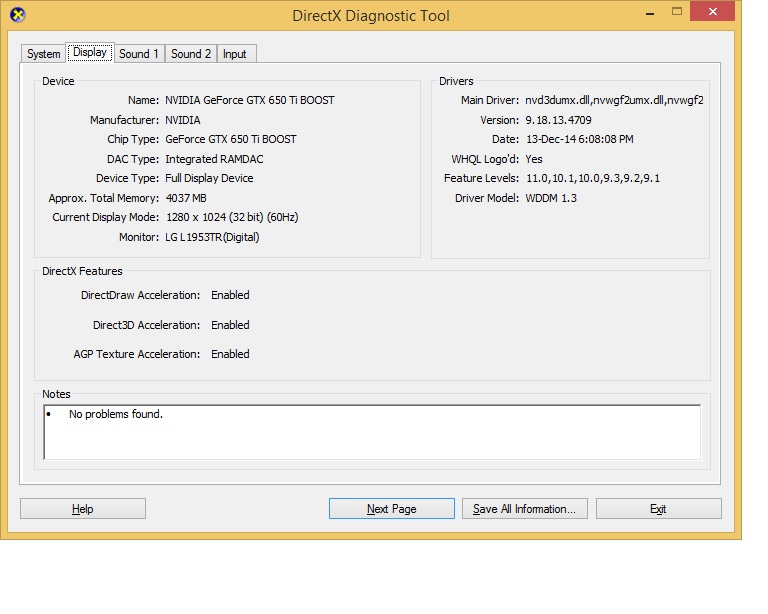
oh... not directx... is the WDDM... in windows 7 it is 1.1 only... now in windows 8.1 it is 1.3
Windows Display Driver Model (WDDM)[1] is the graphic driver architecture for video card drivers running Microsoft Windows versions beginning with Windows Vista.[2]

It is a replacement for Windows XP display driver model[3] and is aimed at enabling better performance graphics and new graphics functionality.[2] Display drivers in Windows Vista and later can choose to either adhere to this model or to Windows 2000 Display Driver Model (XDDM).[4] With the removal of XDDM from Windows 8, however, WDDM became the only option.[5]

WDDM provides the functionality required to render the desktop and applications using Desktop Window Manager, a compositing window manager running on top of Direct3D. It also supports new DXGI interfaces required for basic device management and creation. The WDDM specification requires at least Direct3D 9-capable video card and the display driver must implement the device driver interfaces for the Direct3D 9Ex runtime in order to run legacy Direct3D applications; it may optionally implement runtime interfaces for Direct3D 10/10.1 and higher.

From http://en.wikipedia.org/wiki/Windows_Display_Driver_Model

Jan 16, 2015#22

well...mine is 1.2 in win 8 pro x64 ....so i guess the problem come in the WDDM 1.1 only?

Jan 17, 2015#23

After extensive testing I have come to the conclusion that this is deffinately a software related issue and not hardware related. Aero would always disable itself upon launching BS and revert to windows 7 basic. I trauled through the BS registry entries and conducted further tests. I then created a "new" user on my system and tried to run background mode again with great success.

Finally I decided to perform a clean installation of Windows 7 and now the function works flawlessly and captures screenshots in both foreground and background mode.

Jan 17, 2015#24

@Envyus
Before you create new user in old windows 7. Are you able to do background mode/capturing bs window in background?

May I know what graphic card you using?

Jan 17, 2015#25

@dinobot
No I was only able to return the black screen prior to creating a new user account.
My GPU is a AMD Radeon HD 6470M onboard 512mb.

Jan 18, 2015#26

@dinobot im on win 8 x64 now...just take the screenshot...and guess what...it work!! like you said, it must be soft problem =D

Think your 5770 was one generation after my previous graphic card 4770. At time only windows 7 compatible. At least 5-6 yr old.

Check your DirectX version in windows now.  Think the screen capture is control by software rendering by DirectX.

I tried Andy emulator on windows 7 but it is very lag to me.  Now I am going to try it again in windows 8.1 to see if it is smoother...

I reccomend you to try duos-m,best performance so far,you can enable root from configuration and i AM enjoying it,but the 9.99$ to pay to have it is blocking His growth,the trial is 30 day

PS:25k on antutu Asus t100ta Intel z3740

Jan 18, 2015#27

i must to tell u guys...with win8 this bots rock!!! have it running for almost 36hs and no problem at all!! and almost forget..the hide function its working great!! but the cross version it isnt...so im on v5.4.2.2 atm, keep it up guy!! this is awesome!

Jan 18, 2015#28

After extensive testing I have come to the conclusion that this is deffinately a software related issue and not hardware related. Aero would always disable itself upon launching BS and revert to windows 7 basic. I trauled through the BS registry entries and conducted further tests. I then created a "new" user on my system and tried to run background mode again with great success.

Finally I decided to perform a clean installation of Windows 7 and now the function works flawlessly and captures screenshots in both foreground and background mode.

I also experienced with that, i have tried the bot on 3-4 computer with win7 x64-x86, win8 x64-x86, both with nvidia and amd but most of the tries with old installations of windows failed but after i re-installed windows they functioned without any problem. And once i re-installed windows i didnt even install directx other than windows default one.

Jan 19, 2015#29

@Envyus
After creating new user in Windows 7, it works!.. lol.. your graphics model was same age or older than my previous 6770. haha.. Thanks for the extensive test...

Guess we managed to solve the mystery to black screen..

Cheers!

Jan 19, 2015#30

working for me! When bot started training troops, i click on firefox so BS window was hidden behind (not minimized though)


    BLUESTACKS

BlueStacks is open and not minimized
Resolution: 860, 720

    AUTOIT

Version: 3.3.12.0
Native x64
Compiled

    SPECS

CPU: X64
OS: X64; WIN_7

    DESKTOP

Aero Enabled
Depth: 32
Resolution: 768, 1280
Refresh rate: 60

    FUNCTION CALL

_WinAPI_GetDC: 0x00000000640122A6
_WinAPI_CreateCompatibleDC: 0x000000002501119D
_WinAPI_CreateCompatibleBitmap: 0xFFFFFFFFBF051F84

Got something to add?

Log in to post a reply.

Join the conversation