I dont really know how to code but I am skilled at the game and would be able to offer quality insight for features. I qould also be happy to test!
Video Game Reverse Engineering
Developing Bot
Started by Antidote · Dec 5, 2014
@alba3: actually the code does the same thing, with some image manipulation i think
@hax4days: good luck with finals man, feel free to contribute anytime
@vanadium: here's my tesseract traineddata: https://mega.co.nz/#!dpdDhQKT!Rrf4Yx7Pmvm3vj598CtUcB4bCFd9C-Xn0NhmOCU_ao0
I trained it with supercell-magic_5.ttf font: https://mega.co.nz/#!wt1GwYhA!EJIYKn8bClYAe8MwGZZRAQO9phURkhaPDR9LgbtKFkI
you can add "digits" to tesseract shell command to make it recognize only numbers. it works better for me that way.
@alba3: actually the code does the same thing, with some image manipulation i think
@hax4days: good luck with finals man, feel free to contribute anytime
@vanadium: here's my tesseract traineddata: https://mega.co.nz/#!dpdDhQKT!Rrf4Yx7Pmvm3vj598CtUcB4bCFd9C-Xn0NhmOCU_ao0
I trained it with supercell-magic_5.ttf font: https://mega.co.nz/#!wt1GwYhA!EJIYKn8bClYAe8MwGZZRAQO9phURkhaPDR9LgbtKFkI
you can add "digits" to tesseract shell command to make it recognize only numbers. it works better for me that way.
Hi guys thanks @antinode for creating this thread. My question is that is possible to detect trap in enemy village ?!! If that could be possible that wil be amazing?
Also guys if anyone if u have an iphone there is an bot that work really amazing(just train and attack and keep active) just try it.
Hi guys thanks @antinode for creating this thread. My question is that is possible to detect trap in enemy village ?!! If that could be possible that wil be amazing?
Also guys if anyone if u have an iphone there is an bot that work really amazing(just train and attack and keep active) just try it.
Not sure what you mean by detecting trap? It's not even visible to the attacker.. if what you mean is detect opponent's town hall and defence level then you need to do some image compare, I haven't worked on that one yet
Could it be that you're talking about imod/xmod? It's mostly a tool, not really a bot..
#include <Tesseract.au3>

HotKeySet("a", "ReadValue")
Func ReadValue()
  $Read = _TesseractWinCapture("BlueStacks App Player","",0,"",1,2,42,70,660,490,0) ;Capture screen region with gold and elixir
  msgbox (0, "Result", $read)
  $Read = StringSplit(StringStripWS($Read, 1+2+4), @CRLF) ;Strip whitespaces & blank lines and split into array
  $Gold = Number(StringStripWS($Read[2], 8)) ;Convert gold to number
  $Elixir = Number(StringStripWS($Read[3], 8)) ;Convert exlir to number
  $Dark = Number(StringStripWS($Read[4], 8)) ;Convert dark to number
  MsgBox(0,"Result", "Gold: " & $Gold & @CR & "Elixir: " & $Elixir & @CR & "Dark: " & $Dark)
EndFunc

while 1
 sleep(200)
WEnd
First of all thanks 🙂 .
Based on the details you given out so far, I have
- Installed Tesseract-OCR (https://code.google.com/p/tesseract-ocr/)
- Placed the coctraineddata into Tesseract-OCR/tessdata/ (What else should I do other than placed into the folder?)
- Installed supercell-magic_5.ttf font
- Used Tesseract.au3 (http://www.autoitscript.com/forum/topic/89542-tesseract-screen-ocr-udf/)
- Launched bluestacks and COC. Zoom out all the way before start search war.
- So far, the decoding is pretty much working but success rate of 10% or less.
- Each time the decoding executed, the tesseract command window (black window) will appear and disappear (Pretty annoying - How to prevent the black window show up?)
- Next, the $read msgbox will pop up and some of the captured are letters. (Screen shot below)
- The part that i do not understand is "you can add "digits" to tesseract shell command to make it recognize only numbers"
- Did i missed out anything?

@odySSeys: Sorry I wasn't being clear. You have to edit the file Tesseract.au3, just open it and look for this line under func _TesseractWinCapture:
ShellExecuteWait(@ProgramFilesDir & "\tesseract\tesseract.exe", $capture_filename & " " & $ocr_filename)change it to
ShellExecuteWait(@ProgramFilesDir & "\tesseract\tesseract.exe", $capture_filename & " " & $ocr_filename & " " & "-l coc" & " " & "digits", "", "", @SW_HIDE)"-l coc" is to specify language (in this case we use the prefix 'coc'), "digits" to recognize number only, "@SW_HIDE" to hide tesseract command window
Run it again and the accuracy should be much better now
Since it's quite troublesome to set up everything right, I decided to move everything into one folder to make things easier.
Inside this folder is Tesseract-OCR portable with traineddata included, edited Tesseract.au3 file and Test.au3 script I made to check Tesseract's accuracy.
I personally tested with all 3 resolutions and it works fine. You don't have to install anything. Just open Bluestacks, stay at your main village and open the script. It will begin searching opponents and display gold & elixir on screen. Feel free to tweak the screen region in the script for optimal reading (I'm still experimenting myself) and let me know how it works for you guy 🙂
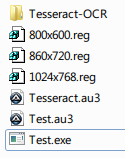
https://mega.co.nz/#!Y0NBWbjK!l0m74jAce38PiLUyT4hWUYHtr_397oa4CkSQRzjC_OQ
script only: http://pastebin.com/2gNxVSK1
Since it's quite troublesome to set up everything right, I decided to move everything into one folder to make things easier.
Inside this folder is Tesseract-OCR portable with traineddata included, edited Tesseract.au3 file and Test.au3 script I made to check Tesseract's accuracy.
I personally tested with all 3 resolutions and it works fine. You don't have to install anything. Just open Bluestacks, stay at your main village and open the script. It will begin searching opponents and display gold & elixir on screen. Feel free to tweak the screen region in the script for optimal reading (I'm still experimenting myself) and let me know how it works for you guy 🙂
https://mega.co.nz/#!Y0NBWbjK!l0m74jAce38PiLUyT4hWUYHtr_397oa4CkSQRzjC_OQ
script only: http://pastebin.com/2gNxVSK1
I used it and it pressed attack and went to find base. The first base it found was very low gold/elixar. It let the timer wind down and it never skipped the base (to search for more loot) nor did it deploy any troops. Don't know if this is what was supposed to happen and if it was it actually did a really good job. Otherwise did i do something wrong so it didn't keep searching. Keep up the good work and i plan to help when i get done with finals!
Did it show current search valuel like this?
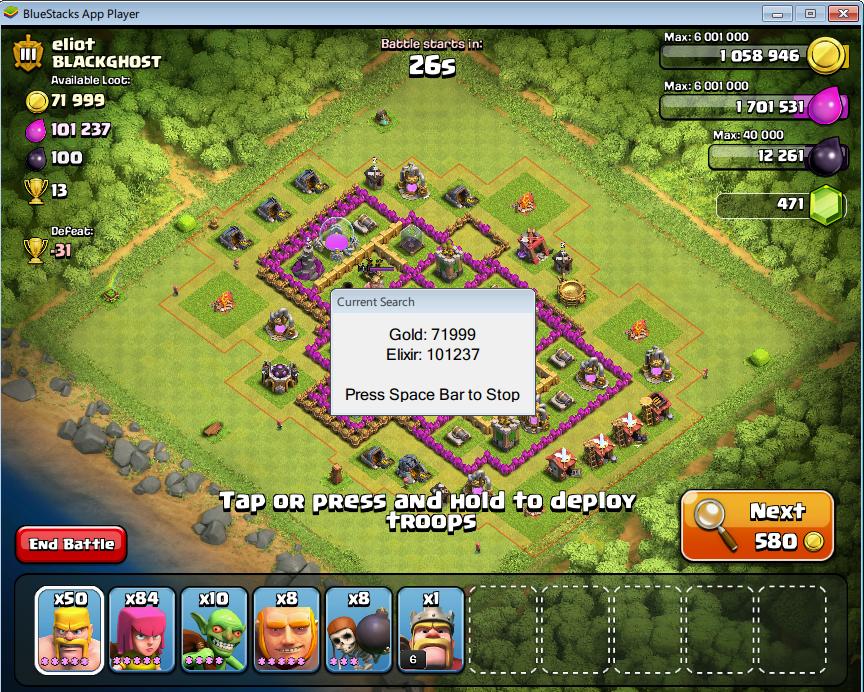
Did you download the whole folder or just the script? Might be it got stuck at the CheckScreen func. Try remove it and see how it goes
Best if you just download the folder and run from there. Everything is preconfig :D
It said Tesserect Gold and Elixar Test
Press space to stop
I am running Test.exe
This discussion is closed.