cant download the bot on tinyupload can u please put sir an alternative link thank you
Video Game Reverse Engineering
Developing Bot
Started by Antidote · Dec 5, 2014
@AtoZ I guess those are indicators for what type of arguments you are passing to HD-RunApp.exe, but I got those from the shortcut files and I found out you can run COC from it. I've also been messing around with other arguments to make it return to the menu of bluestacks, but I have no luck since I don't really know what to put. It'll be great if we can figure out a the arguments to get to the menu. Otherwise, we can just use a controlclick on the home button located at the bottom of bluestacks.
Regarding the bot, I will be working on it later and releasing bug fixes and new implementations.
P.S. @AtoZ Great job on the Zombie/Dead base search, it really works well and it is amazing. However, needs improvements since it probably will skip those gemmed up collectors and also it skips dead bases sometimes. Also, is there anyway to use imagesearch without needing to know what system you have, ie 64 or 32-bit, I had troubles with it and I learned that you have to have the specifics. Anyways, great job on the zombie/dead base search functions hope we can improve it in the future.
If not control click then we can use imagesearch for the home button. I can't access the 'app button' on my keyboard when running coc. There's an input mapper tool in BS by pressing ctrl+alt+i but I couldn't find the button too.
Yup I tested the zombie code on a th8 account and some skipped some e9f10. Probably the reason why it worked so well for e10 and e11 collectors was their similarity that helped identify themselves. Maybe we should include e8 as well or even e7 just for th8 or 7. All we have to do is just increase the number of loop where the imagesearch is and add the folders and images. If you managed to get a screenshot of the skipped collectors please send it here. I'll look into it.
About the 64 and 32 bit imagesearch, I'm not familiar with editing dll files. But among the versions of imagesearch, that is the only one that worked in my system. I'll try to look if there is a combined version.
How about fastfind in your past ver004? is it similar to imagesearch?
Hey all,
I was waiting for GKevinOD's release before I started working on it.
I've added a few things:
Pre-Alpha v005_1 Update Log (Kaz):
- Able to save position of GUI window
- Added Random Factor to be able to randomize the delays (avoid bot detection)
- Able to log now - under /logs (mainly for debug)
Link: http://s000.tinyupload.com/?file_id=98797944845128940889
Source code and 32/64 bit versions are also in this link.
Nice work Kaz,
Nice i know why i dont have those restart problem... Coz I did have but the restart went well and i didnt see the loop restart. The log really helps.
And also the save last position of GUI is good. Ask if you can also give the code to make bluestacks windows to move to last known position.
dinobot wrote:
Kaz wrote:
Hey all,
I was waiting for GKevinOD's release before I started working on it.
I've added a few things:
Pre-Alpha v005_1 Update Log (Kaz):
- Able to save position of GUI window
- Added Random Factor to be able to randomize the delays (avoid bot detection)
- Able to log now - under /logs (mainly for debug)
Link: http://s000.tinyupload.com/?file_id=98797944845128940889
Source code and 32/64 bit versions are also in this link.Nice work Kaz,
Nice i know why i dont have those restart problem... Coz I did have but the restart went well and i didnt see the loop restart. The log really helps.
And also the save last position of GUI is good. Ask if you can also give the code to make bluestacks windows to move to last known position.
Yup I can do that! I'll add it to my list of things to do!
Made some bug fixes and fixed the checkMainScreen function.
Pre-Alpha v005.2 Update Log (GkevinOD):
- Added Kaz's functions
- Fixed checkMainScreen function
- Added Two and Three sides attack in Barch Algorithm
- Increased speed in troop drop for more productivity
- Added a clear textbox once in a while
Compiled x32 : https://mega.co.nz/#!2Z5hkKDb!avTrxMrkl8P34lLA4LbC3pqoFOnwlp8u92Y6ncQmY2Q
Compiled x64: https://mega.co.nz/#!ndRSxQ7L!VS7KXY3mYcpCe0JQ8qt88dsGxFx_SK8ob6f8k14yAZo
Script v005.2: https://mega.co.nz/#!rFJiBJCa!AMvKkDEcF4rWQkdlCo1SG0sM6oeK_h5SUs7Pef_G0_o
Made some bug fixes and fixed the checkMainScreen function.
Pre-Alpha v005.2 Update Log (GkevinOD):
- Added Kaz's functions
- Fixed checkMainScreen function
- Added Two and Three sides attack in Barch Algorithm
- Increased speed in troop drop for more productivity
- Added a clear textbox once in a while
Compiled x32 : https://mega.co.nz/#!2Z5hkKDb!avTrxMrkl8P34lLA4LbC3pqoFOnwlp8u92Y6ncQmY2Q
Compiled x64: https://mega.co.nz/#!ndRSxQ7L!VS7KXY3mYcpCe0JQ8qt88dsGxFx_SK8ob6f8k14yAZo
Script v005.2: https://mega.co.nz/#!rFJiBJCa!AMvKkDEcF4rWQkdlCo1SG0sM6oeK_h5SUs7Pef_G0_o
Thanks mate, reading through your script to see if I can help with some stuff. What resolution is required for bluestacks. After setting the barracks location, it can make troops on the first barrack but clicks in the middle of the menu and misses the other four barracks. I'm assuming this is a resolution error. What are you working on or would like others to work on. I'm familiar with bot making with ImageSearch, PixelSearch, and getPixelColor.
Cheers,
Cryzies
Thanks mate, reading through your script to see if I can help with some stuff. What resolution is required for bluestacks. After setting the barracks location, it can make troops on the first barrack but clicks in the middle of the menu and misses the other four barracks. I'm assuming this is a resolution error. What are you working on or would like others to work on. I'm familiar with bot making with ImageSearch, PixelSearch, and getPixelColor.
Cheers,
Cryzies
The bot uses 860x720 for the resolution
@Cryzies
860x720 for resolution
there is registry file uploaded by Antidote at first post 🙌
Made some bug fixes and fixed the checkMainScreen function.
Pre-Alpha v005.2 Update Log (GkevinOD):
- Added Kaz's functions
- Fixed checkMainScreen function
- Added Two and Three sides attack in Barch Algorithm
- Increased speed in troop drop for more productivity
- Added a clear textbox once in a while
Compiled x32 : https://mega.co.nz/#!2Z5hkKDb!avTrxMrkl8P34lLA4LbC3pqoFOnwlp8u92Y6ncQmY2Q
Compiled x64: https://mega.co.nz/#!ndRSxQ7L!VS7KXY3mYcpCe0JQ8qt88dsGxFx_SK8ob6f8k14yAZo
Script v005.2: https://mega.co.nz/#!rFJiBJCa!AMvKkDEcF4rWQkdlCo1SG0sM6oeK_h5SUs7Pef_G0_o
testing right now. i'll let u know the result.
thanks a lot @GkevinOD
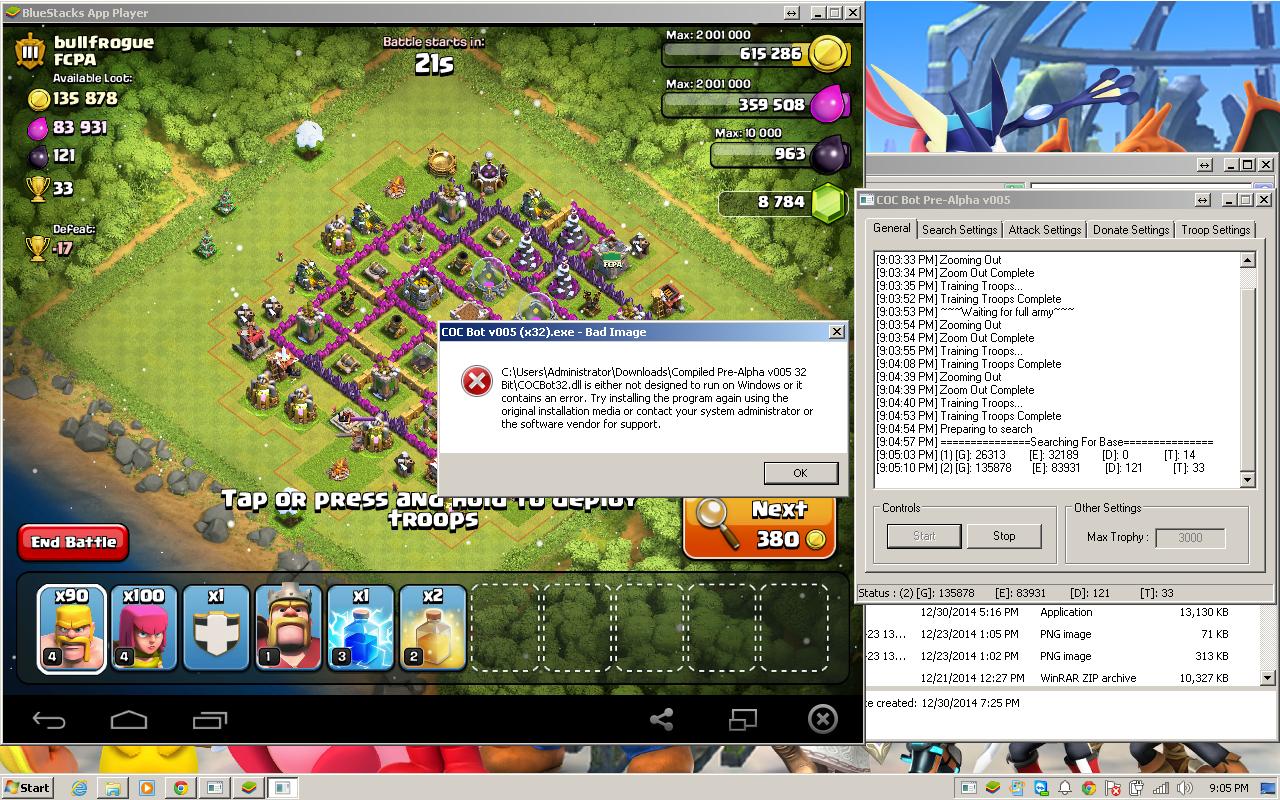
Thanks guys, when I run the .reg file Antidote uploaded on his host site and run BlueStacks. I still get 866, 745 as a resolution according to AutoIt Window Info... Any tips?
Edit:
Got it worked out, seems like the search was clicking on a nearby wall to the left instead. However got this bug after it started searching:
Hey all,
I was waiting for GKevinOD's release before I started working on it.
I've added a few things:
Pre-Alpha v005_1 Update Log (Kaz):
- Able to save position of GUI window
- Added Random Factor to be able to randomize the delays (avoid bot detection)
- Able to log now - under /logs (mainly for debug)
Link: http://s000.tinyupload.com/?file_id=98797944845128940889
Source code and 32/64 bit versions are also in this link.
Hey Kaz/everyone. How do we change the default position of the GUI window? I've been running BS on my second monitor so I can watch videos on the primary, and right now the bot is moving it to what I guess is (0,0) on my main monitor. Do we need to change within the code, or am I missing something obvious?
This discussion is closed.