The Bytecode Club
Log inJoin the club
Video Game Reverse Engineering

Developing Bot

Started by Antidote · Dec 5, 2014

1,033 replies21,297,466 viewsLocked
Dec 12, 2014#51

Thanks odySSeys .
I did it. But still the same. Herre is vid 🙂

Ops.. I forgotten to tell you that you MUST zoom all the way out.. til maximum..
I have edited the step above.
If possible, try delete the video on youtube. We would like to keep it low profile first as it is very buggy and we would like people to contribute rather leeching only

Dec 12, 2014#52

@Antidote

I noticed that you prefer to use ControlClick. I prefer to use MouseClick as I can see the point move (like ghost control). 😎
Secondly, I did try to use ImageSearch, but I couldn't get it to work. So I used PixelSearch instead.

Below are some of my coding, hope it can help you.

Func ClkAttackButton()
   $Pixel = PixelSearch(0,0,900,700,0xF0E5D6) ;Attack! button
   If IsArray($Pixel)= True Then
	  MouseClick("primary",$Pixel[0],$Pixel[1],1)
   Else
	  Sleep(200)
	  ClkAttackButton()
	  $Count = $Count + 1
	  If $Count = 5 Then
		 Exit
	  EndIf
   EndIf
EndFunc

Func ClkFindMatch()
   $Pixel = PixelSearch(0,0,900,700,0xF8E0A7) ;Find a match button
   If IsArray($Pixel)= True Then
	  MouseClick("primary",$Pixel[0]+60,$Pixel[1]+30,1)
	  Sleep (1000)
	  $Pixel = PixelSearch(0,0,900,700,0xE8EAE0) ;Shield is active window
	  If IsArray($Pixel)= True Then
		 $Pixel = PixelSearch(0,0,900,700,0xCCE870) ;Okay button
		 If IsArray($Pixel)= True Then
			MouseClick("primary",$Pixel[0],$Pixel[1]+5,1)
		 EndIf
	  EndIf
   Else
	  Sleep(200)
	  ClkFindMatch()
	  $Count = $Count + 1
	  If $Count = 5 Then
		 Exit
	  EndIf
   EndIf
EndFunc


Func ClkCollectLoot()
   $Pixel = PixelSearch(0,0,900,700,0xB0B870) ;Gold&Elixer Collector bubble icon
   If IsArray($Pixel)= True Then
	  MouseClick("primary",$Pixel[0],$Pixel[1],1)
	  Sleep (100)
   EndIf
   $Count = $Count + 1
   If $Count = 2000 Then
	  Exit
   EndIf
   ClkCollectLoot()
EndFunc
Dec 13, 2014#53

odySSeys wrote:

qaqaq wrote:

Thanks odySSeys .
I did it. But still the same. Herre is vid 🙂

Ops.. I forgotten to tell you that you MUST zoom all the way out.. til maximum..
I have edited the step above.
If possible, try delete the video on youtube. We would like to keep it low profile first as it is very buggy and we would like people to contribute rather leeching only

I deleted vid. But It seems the same old. I think i missing something.

Dec 13, 2014#54

qaqaq wrote:

odySSeys wrote:

qaqaq wrote:

Thanks odySSeys .
I did it. But still the same. Herre is vid 🙂

Ops.. I forgotten to tell you that you MUST zoom all the way out.. til maximum..
I have edited the step above.
If possible, try delete the video on youtube. We would like to keep it low profile first as it is very buggy and we would like people to contribute rather leeching only

I deleted vid. But It seems the same old. I think i missing something.

Try install tesseract installer with the .exe. (https://code.google.com/p/tesseract-ocr/downloads/list)
If it still doesn't work, try install AutoIt3 with the full installation (https://www.autoitscript.com/site/autoit/downloads/)

Dec 13, 2014#55

It working right now ! Thanks odySSys.

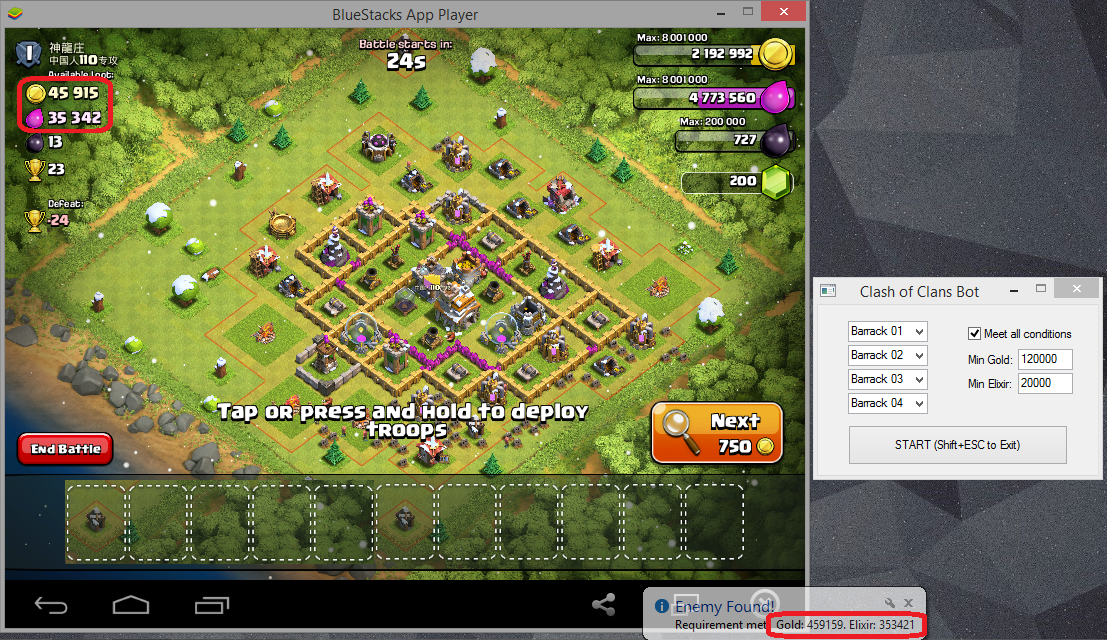
Great!. But i just noticed that sometime recognize wrong number gold and elixir :D

Dec 14, 2014#56

@qaqaq
Yes, it isn't perfect. If you read the post from the beginning. U might come across that @antidote and me did mention sometime random number appear at the back especially winter update. If you have the time, you can contribute by making the tesseract smarter in reading figure. @Antidote has taught tesseract to understand basic numbering which is stored in coc.traineddata

Secondly, how did you got it to work? so that I'm aware of what caused your problem.

Dec 14, 2014#57

I Forgot copy Tesseract-OCR folder to /AppData/Local/Tesseract-OCR lol

Dec 14, 2014#58

I tried adding more value to '$Left' on Line 21 and the script read the search values properly.

Global $Left = 45+10, $Top = 70, $Right = 660, $Bottom = 490

Alternatively, you can try make the adjustments on line 463 as not to affect other configurations.

$Read = _TesseractWinCapture($HWnD,"",0,"",1,2,($Left+10)$x_ratio,$Top$y_ratio,$Right*$x_ratio,$Bottom*$y_ratio,0) ;Capture screen region with gold and elixir

btw, I still wasn't able to manually set my barracks properly with the script.

Dec 14, 2014#59

I tried adding more value to '$Left' on Line 21 and the script read the search values properly.

Global $Left = 45+10, $Top = 70, $Right = 660, $Bottom = 490

Nice job

Dec 14, 2014#60

I am having the same problem that qaqaq use to have, I am running the Search Function script yet it only clicks next once and fails to do anything else. I've looked at the code and it clicks next first without trying to run CheckScreen functions, so I believe that I am having some difficulties with tesseract.
Any help would be much appreciated, I want to be involved in improving the script and helping create a bot 🙂.

EDIT: I didn't read qaqaq's more recent reply and it worked
I got it working, I copied the Tesseract-OCR that came with the bot to the location of where I installed tesseract, 'C:\Program Files (x86)\Tesseract-OCR'. I merged the folder and it worked after that.

This discussion is closed.