The Bytecode Club
Log inJoin the club
Video Game Reverse Engineering

Developing Bot

Started by Antidote · Dec 5, 2014

1,033 replies21,297,466 viewsLocked
Dec 30, 2014#711

Hey there all, I'm so excited about the bot's performance I followed it around for about 8 hours (with some lagging and crashing in between). In the meantime I come up with some ideas which would be great to implement. Not all at this stage but some are maybe handy to implement in the unstable version.

  • placement of troops as close as possible to base
  • when skipping too much bases (defined by user) switch to different mode (bully, attack all)
  • max trophy mode, disable gold count and wait till attack or time ends
  • only trophy mode; don't mind gold/elixer/dark elixer
  • logging enabled so all actions in bot's screen will be logged
  • when failing on attack or something keep alive only plus gold/elixer/dark elixer collecting

I will post my findings and ideas here when I come up with more improvements.

Keep up the GREAT work
Dec 30, 2014#712

I have followed this topic from the beginning and test all realeses and mods , and just want to leave here my pleasure to see a lot of people involved , thanks a lot to : Antidote / GkevinOD / AtoZ / kojometa and others ....

BTW : make a ToDo list in the first post and Updated list also ....there are many answers/replays LOL , I have followed answer the answer because I'm loving this pure sharing environment but following this threat its a hard job

Dec 30, 2014#713

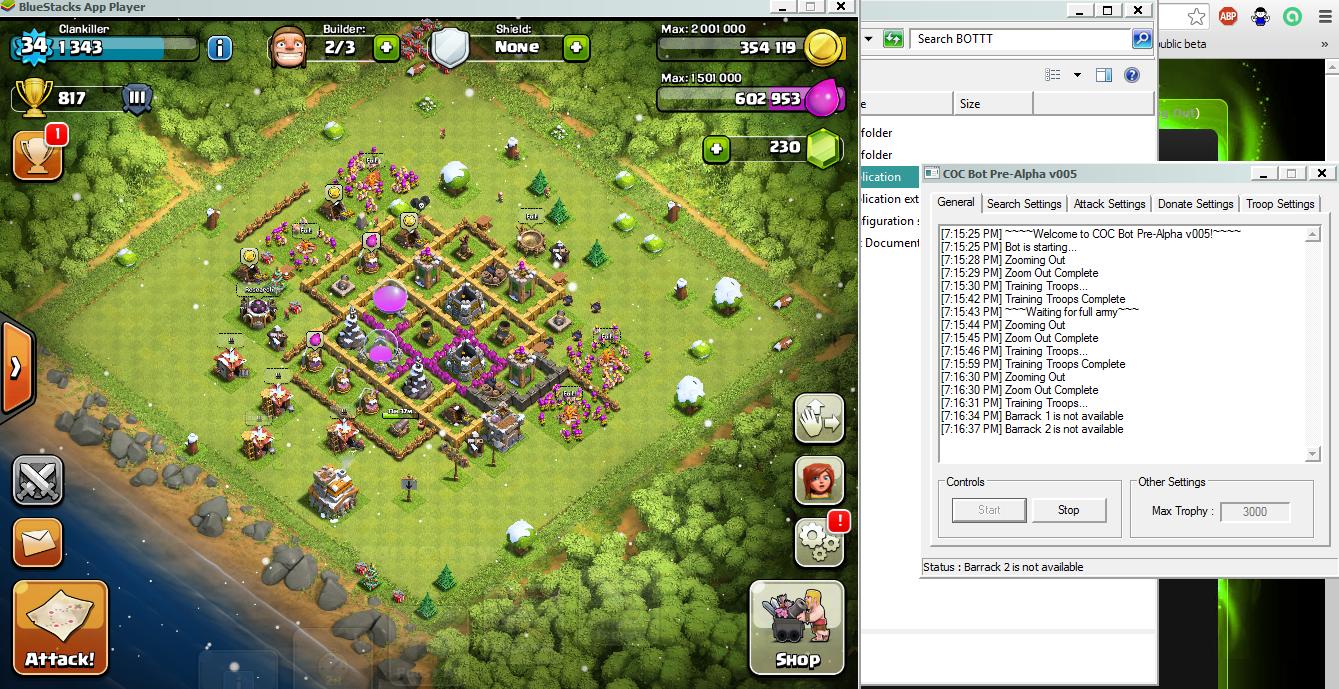
Just tried to run bot but end up in repeating cycles of training troops,pls let me know what i am missing.

Image source

Dec 30, 2014#714

@harshil0014; try to locate your barracks manually. Maybe that wil help. It looks like it doesn't see your barracks 1 and 2. Also keep your mouse out of the BS window during botting.

Dec 30, 2014#715

I have followed this topic from the beginning and test all realeses and mods , and just want to leave here my pleasure to see a lot of people involved , thanks a lot to : Antidote / GkevinOD / AtoZ / kojometa and others ....

BTW : make a ToDo list in the first post and Updated list also ....there are many answers/replays LOL , I have followed answer the answer because I'm loving this pure sharing environment but following this threat its a hard job

I have started compiling an issue/feature list and added some thoughts of my own in it. Just need need the devs email addresses because it's not public. I am in contact with them to sort these out.

@GkevinOD Another great release. Had it running at night, it stopped after two hours, I think it had to do with the out of sync issue but I am not sure. I'll add a crash log to identify the issue the next time it happens.

Dec 30, 2014#716

Hello everyone, I can see that speed is a concern now. I actually tried increasing the speed in the next version because it can run on my computer with no problem, doubling the speed and I couldn't see that it was an issue then. Next version I'll add more options for speed due to slow computers and for longer run time. When I changed the speed in the battle, I removed all delays between troop drops and it increased the chances of me getting close to 100% with B.Arch everytime.

About the two compiled versions 64 and 32-bit. There is a thing with ImageSearch.dll (renamed COCBot32/64.dll) that is specific for which type of system you have. I can't really anything about it, but we'll find a better approach to this later.

Finally, about the repeating restarting BlueStacks, I know the source of the problem. If you can edit the script you can make it work for your computer:

			If FileExists(@HomeDrive & "\" & $ProgramFileDir & "\BlueStacks\HD-RunApp.exe") Then
			   Run(@HomeDrive & "\" & $ProgramFileDir & "\BlueStacks\HD-RunApp.exe -p com.supercell.clashofclans -a com.supercell.clashofclans.GameApp")

The bot tries to re-run the process by using this, but the directory is different for everyone. You can try changing to it the HD-RunApp.exe for your computer if you can find it. ie Mine is "C:\Program Files (x86)\BlueStacks\HD-RunApp.exe" (Don't remove the other parts. It runs the game)

Dec 30, 2014#717

Can you guys give me more detail on when and where the lag occurs?

Dec 30, 2014#718

@GkevinOD mine after skip base around 200+ bot was hang and bluestack restarting automaticaly

Dec 30, 2014#719

If FileExists(@HomeDrive & "" & $ProgramFileDir & "\BlueStacks\HD-RunApp.exe") Then
Run(@HomeDrive & "" & $ProgramFileDir & "\BlueStacks\HD-RunApp.exe -p com.supercell.clashofclans -a com.supercell.clashofclans.GameApp")

If FileExists(@HomeDrive & "" & $C:\Program Files (x86) & "\BlueStacks\HD-RunApp.exe") Then
Run(@HomeDrive & "" & C:\Program Files (x86) & "\BlueStacks\HD-RunApp.exe -p com.supercell.clashofclans -a com.supercell.clashofclans.GameApp")

correct me if im wrong..thanks for the info 🙂

Dec 30, 2014#720

@bushido-21 Try removing the @HomeDrive & "" and completely replace that part with just the directory

This discussion is closed.