whats the problem here? my bot is always training troops even if the bot says training complete i have full troops but the bot is not attacking. the bot always training troops. please help

Started by Antidote · Dec 5, 2014
whats the problem here? my bot is always training troops even if the bot says training complete i have full troops but the bot is not attacking. the bot always training troops. please help
I have same problem as Rekt,Can someone help me via Teamviewer pls?
can you described how the forced break message looks like (from what I remember there's a warning message before that). And does it appear only in main screen or anywhere when it reaches 6 hours limit? The out of sync is easy to fix as it only happens in search screen, if it can happen anywhere it would require tedious check 🙁
@odySSeys: there are check in the code for barrack availability but I haven't tested on less than 4 barracks. I will look into the code again and will let you know when I found the problem
@Antidote,
6 hours forced break message appears in red font message (Don't think we can check on this), after maybe 10 minutes the game kicked out with a screen message similar to out of sync screen message
I can think of few events that trigger this forced break message screen:
Event 1: In the main screen
Potential Checking: Check for the forced break message screen in main screen (Easy Checking can be implement)
Event 2: During clicking to train troops in barracks
Potential Checking: Check for the forced break message screen after the 4th barrack clicking finished. (Easy Checking can be implement)
Event 3: At the attack screen (Screen with goblin bases and "Find a Match" button), you are disable from attack, clicking the "Find a Match" button will not go into search village mode
Potential Checking: After clicking the "Find a Match" button", place a checking on it afterwards to check whether the button is still there. Maybe pixel search might works. if the button is still detected for 30 seconds, cancel the attack screen so that it is back to main screen. We are back to event 1 mentioned.
Event 4: During the bases searching (Mid of bases searching with search screen, when you press next button, the game cannot proceed to search next village)
Potential Checking: Check for the gold and elixir value of the village, if it is stagnant for >10 times, quit the search screen and back to main screen. We are back to event 1 mentioned.
That is what i can think of for now. I am not excel in Autoit code writing, hopefully this can help you all to write a better bot script. Let me know if you need any screenshot or anything else.
By the way, not sure whether breaking the shield to attacking clicking has been added in. The bot needs to breaks the shield to continue attack if you happens to attacked by others during the forced break
@rekt
Refer post#34 for the fix
@rekt
Refer post#34 for the fix
no!
post #34 is about tesseract. the current bot doenst need tesseract anymore.
@rekt what is your solution?
close bluestakcs COMPLETELY! in taskbar too
open a new file on your desktop and name it solution.reg (make sure file-endings are visible)
put the following into it:
Windows Registry Editor Version 5.00
[HKEY_LOCAL_MACHINE\SOFTWARE\BlueStacks\Guests\Android\FrameBuffer\0]
"WindowWidth"=dword:0000035C
"WindowHeight"=dword:000002D0
"GuestWidth"=dword:0000035C
"GuestHeight"=dword:000002D0
"Depth"=dword:00000010
"FullScreen"=dword:00000000
"WindowState"=dword:00000001
"HideBootProgress"=dword:00000001
then run bluestacks again and test the bot.
btw: did u let the bot run through training once? because even if troops are full it will run one full circle of training troops and AFTER that it will first start attacking!
whats the problem here? my bot is always training troops even if the bot says training complete i have full troops but the bot is not attacking. the bot always training troops. please help
i have this same problem, and i solve it with this:
''i update my bs,
and turn this on 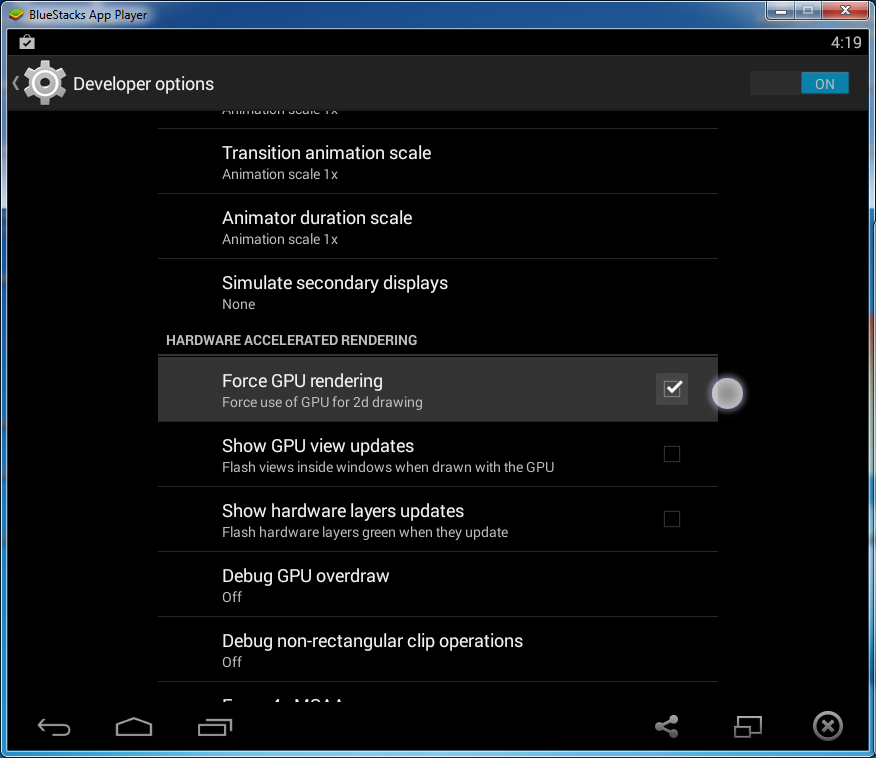 ''
''
kojometa wrote:
fly3r01 wrote:
@rekt
Refer post#34 for the fixno!
post #34 is about tesseract. the current bot doenst need tesseract anymore.
@rekt what is your solution?
close bluestakcs COMPLETELY! in taskbar too
open a new file on your desktop and name it solution.reg (make sure file-endings are visible)
put the following into it:Windows Registry Editor Version 5.00
[HKEY_LOCAL_MACHINE\SOFTWARE\BlueStacks\Guests\Android\FrameBuffer\0]
"WindowWidth"=dword:0000035C
"WindowHeight"=dword:000002D0
"GuestWidth"=dword:0000035C
"GuestHeight"=dword:000002D0
"Depth"=dword:00000010
"FullScreen"=dword:00000000
"WindowState"=dword:00000001
"HideBootProgress"=dword:00000001then run bluestacks again and test the bot.
btw: did u let the bot run through training once? because even if troops are full it will run one full circle of training troops and AFTER that it will first start attacking!
Sorry, wrong post number given, should refer to post #264
kojometa wrote:
fly3r01 wrote:
@rekt
Refer post#34 for the fixno!
post #34 is about tesseract. the current bot doenst need tesseract anymore.
@rekt what is your solution?
close bluestakcs COMPLETELY! in taskbar too
open a new file on your desktop and name it solution.reg (make sure file-endings are visible)
put the following into it:Windows Registry Editor Version 5.00
[HKEY_LOCAL_MACHINE\SOFTWARE\BlueStacks\Guests\Android\FrameBuffer\0]
"WindowWidth"=dword:0000035C
"WindowHeight"=dword:000002D0
"GuestWidth"=dword:0000035C
"GuestHeight"=dword:000002D0
"Depth"=dword:00000010
"FullScreen"=dword:00000000
"WindowState"=dword:00000001
"HideBootProgress"=dword:00000001then run bluestacks again and test the bot.
btw: did u let the bot run through training once? because even if troops are full it will run one full circle of training troops and AFTER that it will first start attacking!
I have did same but still bot wont work
harshil0014 wrote:
kojometa wrote:
fly3r01 wrote:
@rekt
Refer post#34 for the fixno!
post #34 is about tesseract. the current bot doenst need tesseract anymore.
@rekt what is your solution?
close bluestakcs COMPLETELY! in taskbar too
open a new file on your desktop and name it solution.reg (make sure file-endings are visible)
put the following into it:Windows Registry Editor Version 5.00
[HKEY_LOCAL_MACHINE\SOFTWARE\BlueStacks\Guests\Android\FrameBuffer\0]
"WindowWidth"=dword:0000035C
"WindowHeight"=dword:000002D0
"GuestWidth"=dword:0000035C
"GuestHeight"=dword:000002D0
"Depth"=dword:00000010
"FullScreen"=dword:00000000
"WindowState"=dword:00000001
"HideBootProgress"=dword:00000001then run bluestacks again and test the bot.
btw: did u let the bot run through training once? because even if troops are full it will run one full circle of training troops and AFTER that it will first start attacking!
I have did same but still bot wont work
please, look post #321
bot work fine now with d.elixir correction XD
thanks gk and antidote XD
you're amazing guys