The Bytecode Club
Log inJoin the club
Video Game Reverse Engineering

Developing Bot

Started by Antidote · Dec 5, 2014

1,033 replies21,297,466 viewsLocked
Dec 10, 2014#21

Since it's quite troublesome to set up everything right, I decided to move everything into one folder to make things easier.
Inside this folder is Tesseract-OCR portable with traineddata included, edited Tesseract.au3 file and Test.au3 script I made to check Tesseract's accuracy.
I personally tested with all 3 resolutions and it works fine. You don't have to install anything. Just open Bluestacks, stay at your main village and open the script. It will begin searching opponents and display gold & elixir on screen. Feel free to tweak the screen region in the script for optimal reading (I'm still experimenting myself) and let me know how it works for you guy 🙂

https://mega.co.nz/#!Y0NBWbjK!l0m74jAce38PiLUyT4hWUYHtr_397oa4CkSQRzjC_OQ
script only: http://pastebin.com/2gNxVSK1
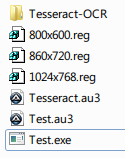
I click on Test.exe and it does what i said form other post

Dec 10, 2014#22

Can you compile and run this script from the same folder? It just display raw output

#include "Tesseract.au3"
#include <TrayConstants.au3>

$Title = "BlueStacks App Player"
$Full = WinGetTitle ($Title)
$HWnD = WinGetHandle ($Full)
WinActivate ($HWnD)

Global $Left = 45
Global $Top = 70
Global $Right = 660
Global $Bottom = 490
Global $BSsize = WinGetClientSize($hWnd)
Global $x_ratio = $BSsize[0]/800, $y_ratio = $BSsize[1]/600

$Read = _TesseractWinCapture($HWnD,"",0,"",1,2,$Left*$x_ratio,$Top*$y_ratio,$Right*$x_ratio,$Bottom*$y_ratio,0)
MsgBox(0,"Read",$Read)
Dec 10, 2014#23

How do i add it?

Dec 10, 2014#25

I have Autoit. Im going to download the file from dropbox and i will let you know how it went!

Dec 10, 2014#26

It did not recognize the file Im not sure what else to do

Dec 10, 2014#27

@Antidote Well done... Excellent stuff  :shadesup:

However, there is a minor issue as shown below:
I'm using 800 x 600 resolution for bluestack. Nearly most of the search, resulted "1" will be placed infront of the value in the current search window.

Dec 10, 2014#28

How did you get it to work? What did you click on?

Dec 10, 2014#29

How did you get it to work? What did you click on?

I'm guessing the different between you and me is the Tesseract installer (https://code.google.com/p/tesseract-ocr/)
I have tried:

  1. Installed Tesseract installer.

  2. Placed the Tesseract.au3 into autoit3/include folder

  3. Run test.exe (from the packaged file)

  4. It work with minor error.

  5. Uninstalled Tesseract installer.

  6. Placed the Tesseract.au3 into autoit3/include folder

  7. Run test.exe (from the packaged file)

  8. It just pause at the attack screen.

Give a try, not sure if is able to help you.

Dec 10, 2014#30

I will try when I get home! Thank you so much:-)

This discussion is closed.