The Bytecode Club
Log inJoin the club
Video Game Reverse Engineering

Developing Bot

Started by Antidote · Dec 5, 2014

1,033 replies21,297,466 viewsLocked
Dec 30, 2014#771

mikypark wrote:

GkevinOD wrote:

@HAX4DAYS The bot only attacks with all sides mode, it doesn't have an algorithm for 3 sides or 2 sides yet.

@mikypark You have to be more specific, I can't really target the problem with your statement.

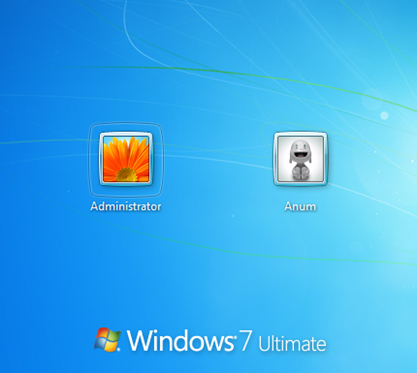
When i go out and let the bot working, after 1 or 2 attacks my pc return to this

lol :bounce:

how about looking into your windows energy options?
switch off screensaver, energy saving mode and all of that stuff 😆

Dec 30, 2014#772

@milkypark
Obviously you have some sort of screen saver on.... Please off them...

Dec 30, 2014#773

People here should start reading post before they post questions. Those bugs/problems already reported numerous times and had already been replied.

For your info, this is a alpha bot, not even beta. If you don't even bother reading post and start asking stupid question, you shouldn't be using this version till it stablised.

Dec 30, 2014#774

@milkypark
Obviously you have some sort of screen saver on.... Please off them...

i don't

Dec 30, 2014#775

@milkypark
If it is not screensaver, then you could have some password on, and when screen turn off after idling for few minutes, they return back to log in page... Why don't you try leaving your pc on without the bot and see if it has the same effect.
I doubt your scenario has any to do with the bot .

Dec 30, 2014#776

The current version of LP enables users to hide the Bluestacks window and it drops it to the very bottom right of your screen by pressing "Hide the BS windows" Do you think this is something that could be coded into this bot?

Dec 30, 2014#777

Bot works good for me! I get decent loot. Definitely better than not having a bot 🙂

Dec 30, 2014#778

@GKevinOD

 Run(@HomeDrive & "\Program Files (x86)\BlueStacks\HD-RunApp.exe -p com.supercell.clashofclans -a com.supercell.clashofclans.GameApp")

what does '-a' and '-p do?

when I use this it surely opens BS and the APP:

 Run('"C:\Program Files (x86)\BlueStacks\HD-RunApp.exe" Android com.supercell.clashofclans com.supercell.clashofclans.GameApp"')

but I know that pixelsearch/getcolors etc won't work properly as you can see there will be no control details shown in autoit window info.

I've been trying out a lot of combinations to incorporate '-a' and '-p' but I usually get the error -"This app is not installed. Please install the app and try again."

I'm currently using a rooted version of bluestacks. I'll try using another version.

Dec 30, 2014#779

@AtoZ I guess those are indicators for what type of arguments you are passing to HD-RunApp.exe, but I got those from the shortcut files and I found out you can run COC from it. I've also been messing around with other arguments to make it return to the menu of bluestacks, but I have no luck since I don't really know what to put. It'll be great if we can figure out a the arguments to get to the menu. Otherwise, we can just use a controlclick on the home button located at the bottom of bluestacks.

Regarding the bot, I will be working on it later and releasing bug fixes and new implementations.

P.S. @AtoZ Great job on the Zombie/Dead base search, it really works well and it is amazing. However, needs improvements since it probably will skip those gemmed up collectors and also it skips dead bases sometimes. Also, is there anyway to use imagesearch without needing to know what system you have, ie 64 or 32-bit, I had troubles with it and I learned that you have to have the specifics. Anyways, great job on the zombie/dead base search functions hope we can improve it in the future.
Dec 31, 2014#780

hey guys
my but work fine,but after 1~2 hour bot window change to white and didnt responding,,just reload the bluestack!(i mean reset bluestack,same as when its not on main screen,,but after clash coming up dont do any thing,just reset again the process)

p.s: sry for my language

This discussion is closed.